Project Operations architecture: Dataverse, Finance, and Dual-write
Ankit Saini · 24 June 2026 · 10 min read
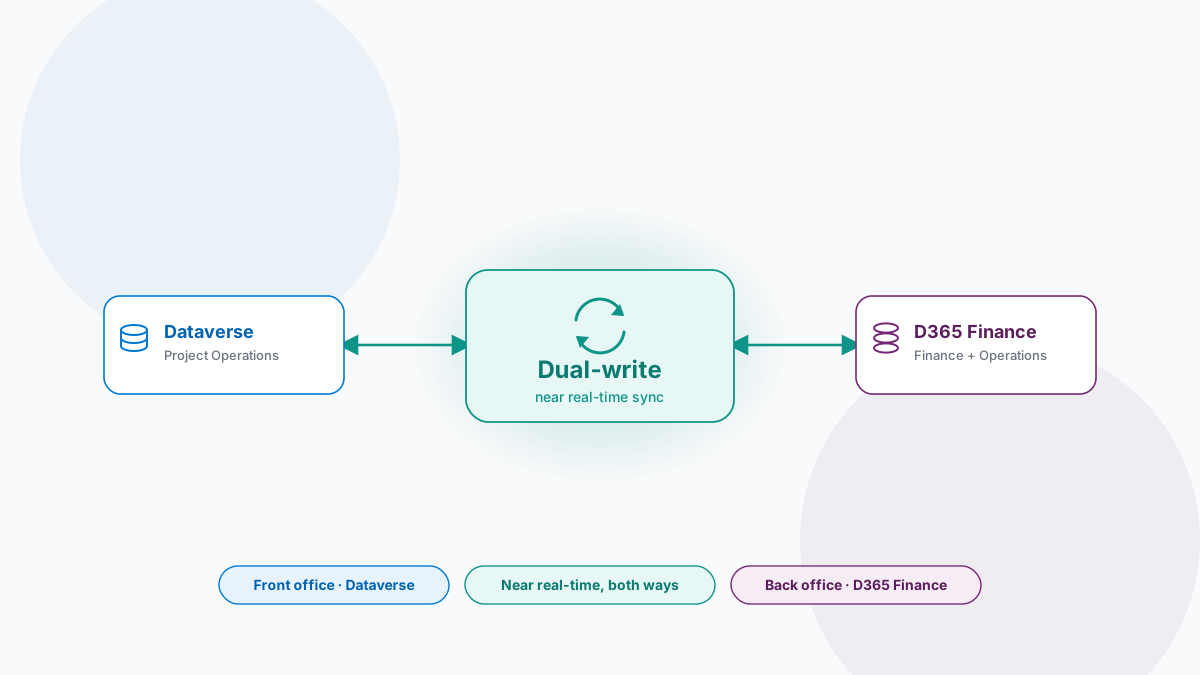
Dynamics 365 Project Operations looks like one application. Underneath, it is two. Project managers plan, resource, and capture time in Dataverse; finance teams post revenue, run invoices, and close the books in Dynamics 365 Finance. The two sit on separate platforms on purpose, and a synchronization layer called Dual-write keeps them holding the same view of the same project in near-real time.
This is a reference walk through that architecture: the data model on each side, how Dual-write moves a record across, which events actually cross the boundary, and how to configure the whole thing.
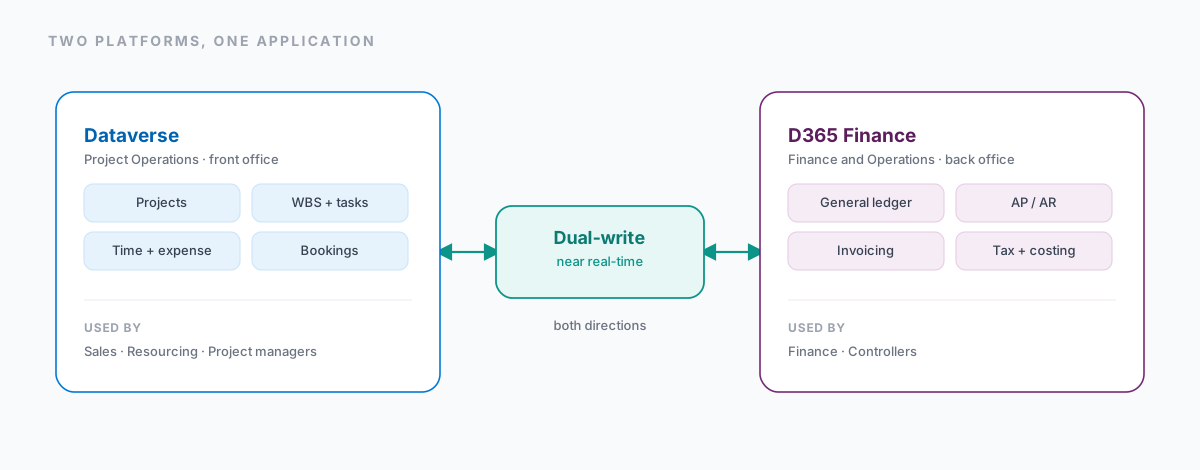
Two platforms, joined at the application layer
Project Operations is deployed across two underlying platforms that are kept deliberately distinct - for performance, security, and licensing - and unified at the application layer through Dual-write.
Dataverse, the front office. The Dataverse layer holds the operational project data: project records, work breakdown structures, resourcing and bookings, time entries, expense entries, and quote-to-contract data. Sales, resourcing, and project managers work here through model-driven apps and Project pages. It is Power Platform-native, so Power Automate, Power BI, Power Apps, and plugins all operate directly against these tables.
Dynamics 365 Finance, the back office. The Finance layer (F&O) holds the general ledger, AP/AR subledgers, fixed assets, cost accounting, the tax engine, and bank management. Project invoice proposals, posted revenue recognition, work-in-progress, and project costing land here once a project is promoted to Finance. Finance teams and controllers consume this layer, and it is the system of record for statutory and tax reporting.
The Project Operations data model on Dataverse
Inside Dataverse, Project Operations adds a dedicated set of tables - prefixed msdyn_ and msp_ - that represent the operational lifecycle of a project, from opportunity through delivery.
| Table | Purpose | Typical owner |
|---|---|---|
| msdyn_project | Core project record: dates, customer, contract type, status | Project manager |
| msdyn_projecttask | Work breakdown structure (WBS) tasks and schedule | Project manager |
| msdyn_resourcerequirement / booking | Resourcing demand and scheduled assignments | Resource manager |
| msdyn_timeentry | Time capture against tasks and projects | Project team member |
| msdyn_expenseentry | Expense capture and reimbursement requests | Project team member |
| quote / msdyn_projectestimate | Sales quoting and project estimation | Sales / PM |
These tables are reachable through standard Dataverse mechanisms - the Web API, FetchXML, plugins, and Power Automate. That is why custom automation can read and update them directly, independent of the Dual-write pipeline. It is exactly how the integration in Syncing Smartsheet milestones into Dynamics 365 Project Operations writes milestone dates straight onto msdyn_projecttask without touching Finance at all.
The Finance data model for projects
On the Finance side, the same project is represented by Finance-native tables built for costing, invoicing, and ledger posting. They live on the F&O Application Object Server (AOS) and its SQL-based data platform, structurally separate from Dataverse.
| Table | Purpose | Typical owner |
|---|---|---|
| ProjTable | Finance project master (mirrors the Dataverse project) | Finance |
| ProjCategory / ProjPriceList | Costing categories and price/rate setup | Finance |
| ProjInvoiceProposal | Draft customer invoices from approved time and expense | Billing specialist |
| ProjTransPosting / LedgerJournalTrans | Posted cost and revenue transactions to the GL | Finance / Controller |
| CustInvoiceJour | Posted customer invoice (AR) | Accounts receivable |
Why a separate platform
There are three reasons the financial back office is kept off Dataverse:
- Performance and depth. F&O runs a relational, batch-optimised engine tuned for high-volume ledger posting, financial dimensions, and the statutory and tax logic that Dataverse does not provide natively.
- Compliance. Multi-entity, multi-currency, and intercompany accounting rules are mature and certified for local statutory requirements across jurisdictions in F&O.
- Licensing. Organisations can license Dataverse-only seats for project teams while keeping finance licensing centralised on F&O.
Dual-write: the synchronization layer
Dual-write is the Microsoft-provided framework that keeps Dataverse and Finance and Operations apps synchronized in near-real time, in both directions. It replaces older, slower, batch-based patterns - such as the Data Integrator and DIXF - for scenarios that need operational consistency between the two platforms.
How Dual-write works
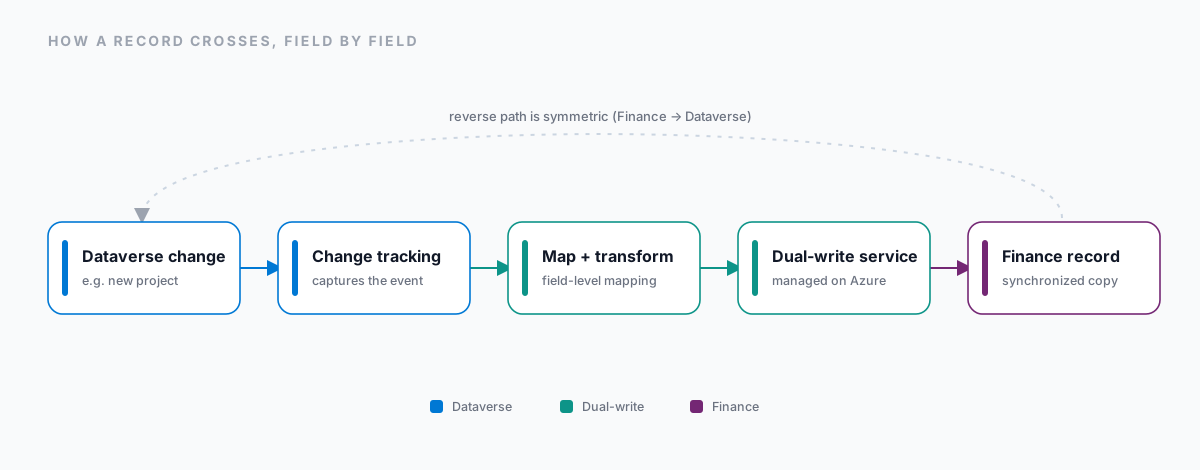
A single record crossing the boundary goes through the same sequence each time:
- A change is made in Dataverse (say, a new project) or in F&O (say, a new project category).
- The change is captured by the Dual-write change-tracking mechanism on the source platform.
- A pre-configured map - linking a Dataverse table and field to its F&O counterpart - transforms the record.
- The transformed record is written to the target platform by the Dual-write service, which runs on Microsoft-managed Azure infrastructure.
- Both platforms now hold a synchronized copy, each keeping its own primary key plus a cross-reference - the company and integration key - so a record can be traced across the two.
The maps that matter for Project Operations
A map is a defined link between a Dataverse entity and an F&O table, with a direction. These are the representative ones for Project Operations:
| Map | Dataverse entity | F&O table | Direction |
|---|---|---|---|
| Projects | msdyn_project | ProjTable | Bidirectional |
| Project contracts | msdyn_projectcontract | ProjInvoiceProposal-linked entities | Dataverse to F&O |
| Project categories | msdyn_projectcategory | ProjCategory | Bidirectional |
| Customers / vendors | Account | CustTable / VendTable | Bidirectional |
| Currency and exchange rates | Currency tables | Currency / ExchangeRate | F&O to Dataverse |
How it behaves in practice
- Latency. Typically a few seconds. Dual-write is event-driven, not batch-scheduled.
- Conflicts. Resolution follows a last-write-wins model, per field map.
- Initial vs incremental. An initial sync run is required when Dual-write is first enabled, to align historical data before the live incremental sync takes over.
- Errors. Failed records land in an error and retry queue visible in the Dual-write admin UI.
- Extensibility. Maps are extensible - custom fields, and even custom Dataverse tables, can be added.
What crosses the boundary, and what stays put
Not every Dataverse change triggers a Finance sync. Day-to-day operational activity is kept inside Dataverse on purpose, so F&O is not flooded with low-value transactional noise. Only approved, financially relevant events cross the Dual-write boundary.
The clearest way to see this is to trace one project from quote to cash.
| Step | Action | Platform of record | Dual-write role |
|---|---|---|---|
| 1 | Quote created and won | Dataverse (Sales) | Customer record synced to F&O |
| 2 | Project and WBS created | Dataverse (PO) | ProjTable created in F&O |
| 3 | Resources booked, time and expense logged | Dataverse (PO) | No sync - stays in Dataverse until approval |
| 4 | Time and expense approved | Dataverse (PO) | Approved transactions synced to F&O for costing |
| 5 | Invoice proposal generated | D365 Finance | Status reflected back to the Dataverse project |
| 6 | Invoice posted to GL/AR | D365 Finance | Posted financial status synced to Dataverse |
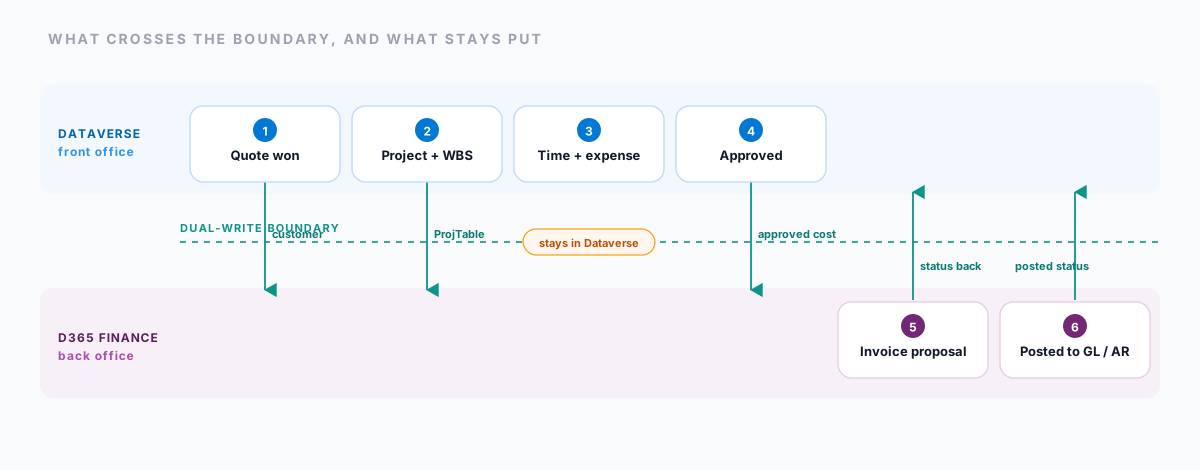
Step 3 is the one worth dwelling on. A team member can log time and expense all week without a single record touching Finance. Nothing crosses until approval, when the financially meaningful version of that work is synced for costing. The boundary is a feature, not a limitation.
Configuring Dual-write, step by step
Standing up Dual-write means configuration on both sides. Because it moves data automatically, getting environment pairing and security right at the start matters more than anything you do later.
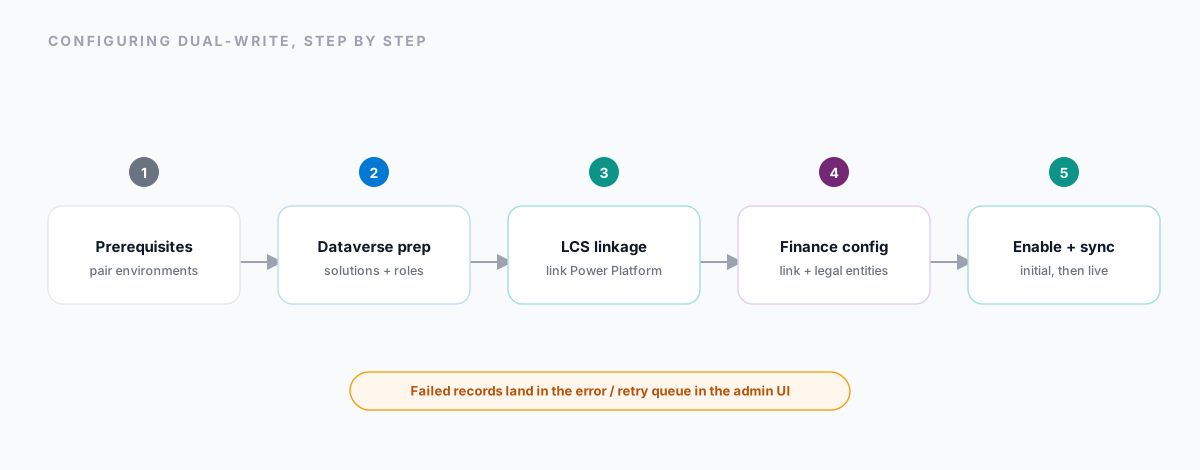
Step 1: Prerequisites and environment pairing
You need System Administrator access in both environments. Dual-write requires an Azure-backed F&O environment paired to a Dataverse environment in the same Microsoft tenant. Pairing is like-for-like: sandbox-to-sandbox and production-to-production are mandatory.
Step 2: Dataverse preparation
From the Power Platform admin center, open your Dataverse environment and install the Dual-write core solution - which carries the metadata for the table maps - and the Dual-write application orchestration solution from AppSource. Then assign the Dual-write runtime user and Dual-write app user security roles to the right application users and the default owning teams, so the integration has read and write permission to update records.
Step 3: Lifecycle Services linkage
The technical link between the F&O AOS and Dataverse is managed in Microsoft Dynamics Lifecycle Services (LCS). Open your F&O environment in LCS, find the Power Platform Integration section, and link your target Dataverse environment. That provisions the back-end connection on Microsoft-managed Azure infrastructure; it usually takes a few minutes, after which a link to the Dual-write administration area is generated.
Step 4: Dynamics 365 Finance configuration
Back in the Finance UI, open the Data management workspace and select the Dual-write tile. Choose New link to environment, point it at the Dataverse environment you linked in LCS, and pick which legal entities will take part in the sync - the company key is what gives you traceability across the two systems. Run the health check, then use Apply solution to load Microsoft's pre-configured mappings.
Step 5: Enable maps and run the initial sync
Choose the specific maps you want to enable - for example, msdyn_project to ProjTable. Before live sync starts, run the initial sync to align historical data in both directions. Once it completes, the maps move to a Running state and Dual-write becomes event-driven, updating records in a few seconds. Anything that fails - missing reference data, a validation failure on the target - lands in the error and retry queue.
Design considerations
A few things worth deciding before you build, not after:
- Plan custom fields with their map in mind. A new field that needs to cross should be designed alongside its Dual-write mapping from the start, not retrofitted.
- Monitor it like any integration. Dual-write traffic deserves the same attention as any other data moving between systems.
- Treat maps as deployable artifacts. Map definitions belong in your CI/CD, versioned and promoted like code.
- Review field-level security on both sides. Because Dual-write moves data automatically, a permission gap on one platform can quietly expose data on the other.
Where this leaves you
Project Operations splits its data on purpose: Dataverse for agile, front-office execution, and D365 Finance for governed, high-volume financial processing. Dual-write is what makes that split invisible to the people using it - project managers stay in Dataverse, finance teams stay in F&O, and both see the same project, kept in step in near-real time, with no point-to-point integration to maintain.
Knowing the table-level mapping, the sync direction, and the lifecycle boundaries is the foundation for everything you build on top: extensions, sync troubleshooting, and further integrations - Smartsheet, DocuSign, external billing - around this core. We took exactly that approach when we synced Smartsheet milestones into Project Operations: write to Dataverse directly, and let Dual-write carry only what genuinely belongs in Finance.
Need help with this?
We implement, extend and integrate Dynamics 365 and the Power Platform, from Project Operations to Power Pages portals. Tell us what you’re planning and we’ll come back within one working day.