Syncing Smartsheet milestones into Dynamics 365 Project Operations
Ankit Saini · 17 June 2026 · 7 min read

Project managers live in Smartsheet. They plan, re-plan, and slip milestone dates there every day. Finance and delivery reporting lives in Dynamics 365 Project Operations. When the two drift apart, the numbers stop meaning anything.
The job is easy to state and hard to do well: every night, read milestone dates from Smartsheet and push them onto the matching project tasks in D365 Project Operations - accurately, idempotently, and without corrupting the project schedule.
This is a walk through a two-part integration: an Azure Function orchestrator and a Dataverse plugin that drives the Project Scheduling Service.
Writing to D365 is the hard part, not reading Smartsheet
Reading Smartsheet is the easy half. Writing to D365 is where it gets awkward. Project Operations will not let you update a task's start or finish date with a normal Dataverse write. The schedule is owned by the Project Scheduling Service (PSS), and PSS is the only supported way to move a task date.
The reason is structural. Project Operations embeds Project for the Web, which runs on a multi-tenant, Azure-hosted scheduling engine. To keep Dataverse and that engine consistent, direct create, update, and delete operations on the scheduling tables - msdyn_projecttask among them - are blocked. You send change requests to the PSS calculation service through its Schedule APIs instead.
PSS has rules of its own, and they shape the whole design:
- It must run under a licensed user. Application users, system users, and integration users are blocked from the Schedule APIs if they hold no Microsoft Project licence.
- It works in transactional units called operation sets - a unit-of-work pattern that processes several requests as one transaction.
- It enforces hard limits: each user can hold at most 10 open operation sets, and each set can hold at most 200 operations.
That last constraint alone shapes the architecture.
Two components, one pipeline
The solution splits into two deployable pieces, each placed where it is allowed to run.
| Component | Technology | Why it exists |
|---|---|---|
| Azure Function | .NET 8, isolated worker | Orchestrates everything outside Dataverse: reads Smartsheet, matches milestones, works out what changed, batches the work, calls the plugin. |
| Dataverse plugin | .NET Framework 4.7.1, sandbox | Runs inside Dataverse under a licensed user so it can legally drive PSS. Does nothing else. |
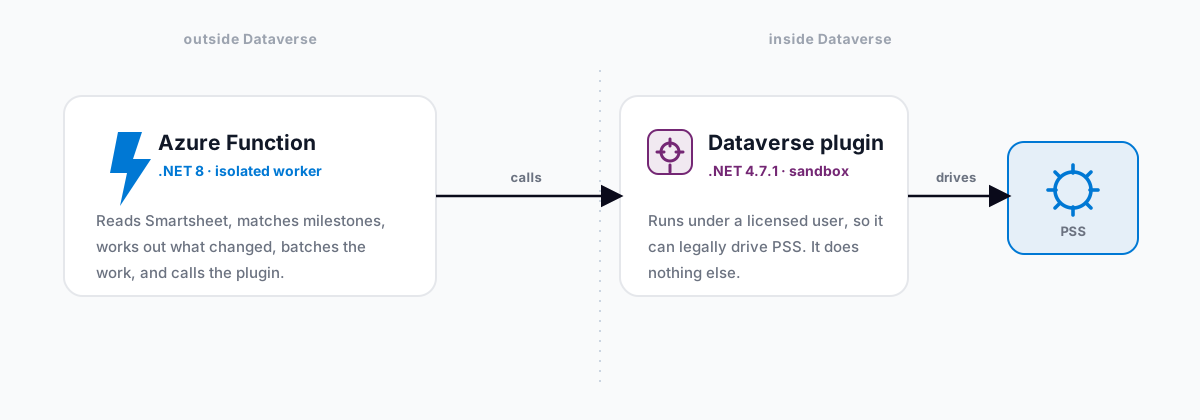
The division of labour is deliberate. The Function does the thinking - network fan-out, fuzzy matching, change detection, batching, audit logging. None of that has to happen inside Dataverse, so it runs where compute is cheap and elastic. The plugin does the one thing that must happen inside Dataverse under a real user: talk to PSS.
Why a plugin at all
Direct updates to msdyn_projecttask date fields are blocked, and PSS owns the schedule - it recalculates dependencies, rollups, and constraints. To change a date you have to:
- Create an operation set (
msdyn_CreateOperationSetV1) - a transactional envelope bound to one project. - Queue each change (
msdyn_PssUpdateV1) - one call per task. - Execute the set (
msdyn_ExecuteOperationSetV1) - submit it, and PSS processes it asynchronously in the background.
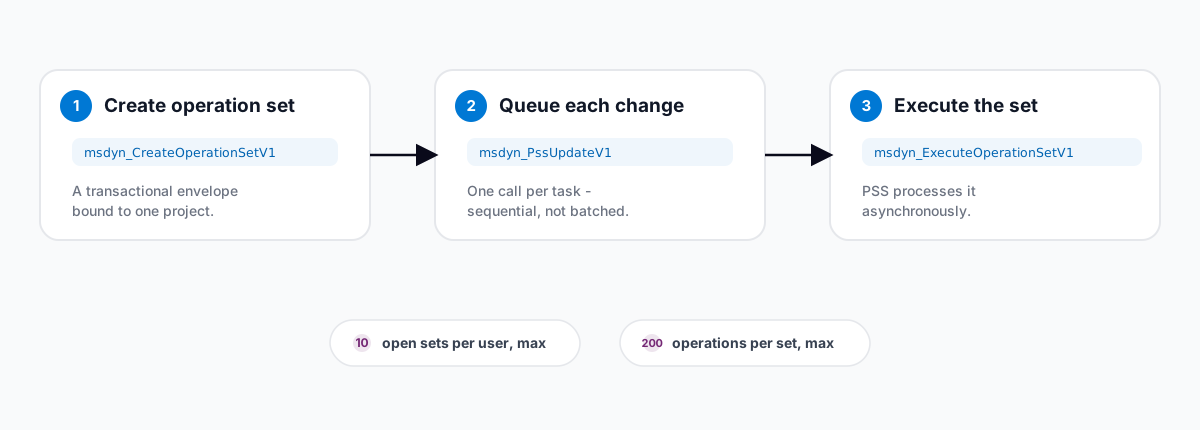
Two non-obvious rules make this awkward from outside Dataverse:
- PSS must run under a licensed user. An app registration or service principal cannot drive it. A plugin registered to run in the calling user's context satisfies the rule.
- The user who creates the operation set must queue the updates into it. That kills the obvious optimisation of batching the
PssUpdateV1calls withExecuteMultipleRequest- impersonation does not carry correctly through batched requests, and PSS rejects the mismatch with aScheduleAPI-OV-0006owner error. So the plugin issues sequential, individualExecute()calls.
One trap worth flagging: write to msdyn_start and msdyn_finish, the writable input fields. Do not write msdyn_scheduledstart or msdyn_scheduledend - those are read-only computed fields that PSS silently ignores, which leaves the operation stuck in Pending forever.
The Azure Function pipeline
The scheduled run is driven by a SyncOrchestrator. Here is the flow, stage by stage.
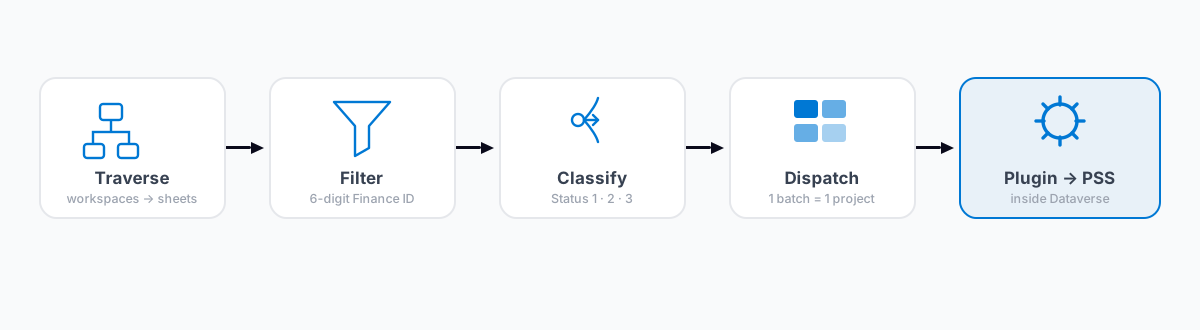
1. Configuration and traversal
Nothing is hard-coded. The Function reads workspace IDs from cread_smartsheetworkspaceconfigs and milestone names from a milestone configuration table. For each workspace, the Smartsheet client walks the tree - workspaces, then folders, then sheets - with a depth-first search capped at 10 levels to guard against pathological nesting.
2. Filtering and deduplication
A sheet only matters if its name contains a 6-digit Finance ID, pulled out with a compiled regex. That Finance ID is the join key to the D365 project. If two sheets in the same workspace claim the same Finance ID, the orchestrator skips the whole colliding group and writes one audit record per sheet, naming the siblings it collided with.
3. Collect and classify milestones, in parallel
For each non-duplicate sheet - up to five at once, gated by a SemaphoreSlim - the Function reads the rows, resolves the D365 project and its tasks, fuzzy-matches each configured milestone name against the project's tasks, compares the Smartsheet dates against the current D365 dates, and stamps each milestone with a status.
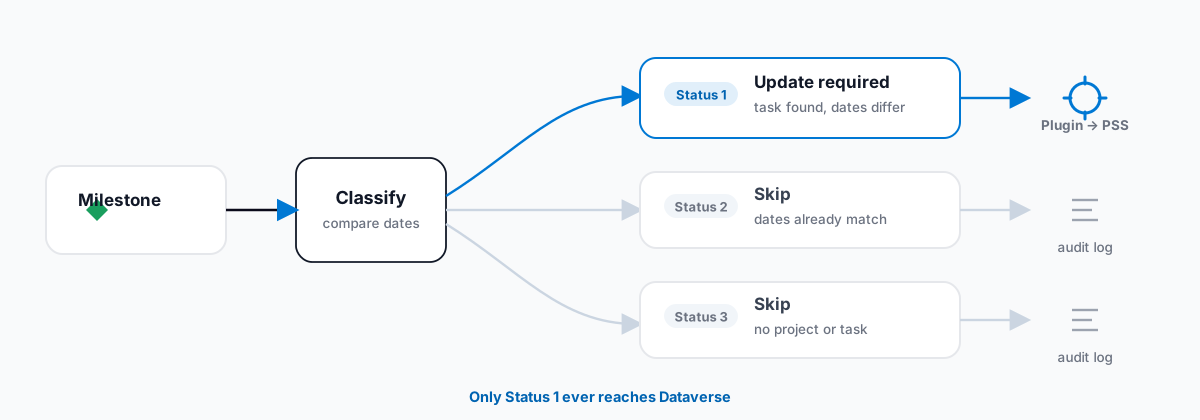
Every milestone ends up as exactly one of three outcomes:
- Status 1 - update required. Task found, dates differ. Sent to the plugin for a PSS update.
- Status 2 - skip. Dates already match. Handled locally, audit log only.
- Status 3 - skip. No project, or no matching task. Handled locally, audit log only.
This classification is the efficiency heart of the design: only Status 1 milestones ever reach Dataverse.
4. Dispatch in project-aware batches
The dispatcher takes the Status 1 milestones, writes the skip logs for Status 2 and 3 locally, then groups the updates by project and chunks each group. Because PSS binds every operation set to a single project, this holds one invariant: one batch is one project is one operation set. Dispatches run in parallel behind a semaphore, capped to stay safely under the per-user limit of 10 open operation sets.
Inside the plugin
The real work happens in a PssService that runs the three-step cycle per project. Its design reads like a list of PSS lessons learned:
- Pre-flight cleanup. Before creating new sets, it abandons any open draft sets left behind by earlier runs - using the supported
msdyn_AbandonOperationSetV1action, not a raw Dataverse delete, which would leave PSS's backend state inconsistent. It only abandons open sets, never pending ones: abandoning a set PSS is actively processing triggers "one or more operation sets do not exist" errors. - Cap guarding. It counts the open sets and bails out early with a structured failure if the project is already at the limit, rather than letting
CreateOperationSetV1throw a server-side fault. - Chunking. PSS allows at most 200 operations per set, so larger projects are split across several sets, each with its own create, queue, and execute cycle.
Lessons worth stealing
If you take nothing else from this build, take these:
- Let the platform's constraints draw your boundaries. The Function and plugin split exists because PSS has to run under a licensed user inside Dataverse. The architecture is honest about that instead of fighting it.
- Classify before you call. Working out Status 1, 2, and 3 upstream means the expensive, rate-limited path only ever sees real changes.
- Match your batch boundaries to the backend's transaction boundaries. One batch, one project, one operation set removes a whole class of "why does this set have two projects" bugs.
- Respect invisible limits. The 10-open-set cap, the 200-ops-per-set ceiling, and the plugin's execution window are encoded as guards and chunk sizes, not discovered in production at 2 a.m.
- Write to the right fields.
msdyn_startandmsdyn_finish, never the read-only scheduled fields. A silent Pending hang is the worst kind of bug. - Audit everything you skip. A skip with a reason is observability. A skip in silence is a support ticket.
Need help with this?
We implement, extend and integrate Dynamics 365 and the Power Platform, from Project Operations to Power Pages portals. Tell us what you’re planning and we’ll come back within one working day.